Black Friday is the ideal time to upgrade your workspace with an ergonomic keyboard that promotes comfort and productivity. In this guide, we’ve analyzed 6 of the best black friday ergonomic keyboard deals 2026 for November 2026, featuring top brands like Adesso, Kensington, Logitech and more. Whether you’re a writer, programmer, or remote worker, a well-designed ergonomic keyboard can reduce strain and enhance your typing experience. Check out our Black Friday 2026 Deals for more savings.
We’ve spent hours researching and comparing the latest models to bring you a curated list of the best black friday ergonomic keyboard deals 2026. Our goal is to help you find the perfect keyboard that combines ergonomic design, reliable connectivity, and long-lasting comfort without breaking the bank.

Pros
- Curved split keyframe and sloping design promote a more natural typing posture.
- Pillowed wrist rest with memory foam provides 54% more wrist support and reduces bending.
- Adjustable palm lift with three tilt settings (0, -4, -7 degrees) for seated or standing use.
- Ergonomist approved and made with 71% post-consumer recycled plastic.
Cons
- Large footprint (about 18 x 9.2 inches) may not suit smaller desk setups.

Pros
- Split sloped keys with adjustable reverse tilt for neutral wrist posture
- Dual wireless connectivity (2.4 GHz and Bluetooth) with government-grade encryption
- Quiet clicking for non-disruptive typing and mousing
- Spill-resistant design adds durability
Cons
- Heavy and large footprint (3 lbs, 22.5 inches wide) may not suit compact desks
- Mouse DPI range limited to 800-1600, less versatile for high-resolution screens
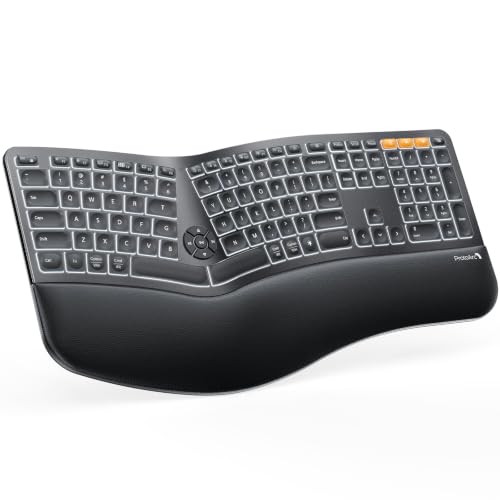
Pros
- Curved split frame, scooped keys, and cushioned wrist rest encourage a natural typing position and help reduce wrist fatigue.
- Switch between three devices via Bluetooth or 2.4G with a simple key press, compatible with Windows, macOS, and Android.
- Adjustable white backlight offers low, medium, and high brightness levels.
- 2000mAh battery lasts up to 90 to 100 days with the backlight off.
Cons
- Wireless only, no wired mode supported.
- Large split frame requires extra desk space; the listing advises checking dimensions before purchase.
- High backlight setting drains the battery in about 12 to 13 hours, so max brightness needs frequent recharging.

Pros
- Ergonomic split-key design promotes natural hand and wrist position
- Quiet membrane switches with tactile feedback and 5 million keystroke lifespan
- Laser mouse works on almost any surface with adjustable DPI (800/1200/1600)
- 20 dedicated hotkeys for quick internet and multimedia access
Cons
- No backlighting on keys
- Operating system compatibility listed only for Windows
- Keyboard footprint is large (22.8 x 13 inches) may not suit compact setups

Pros
- Ergonomic split and sloped design with adjustable tilt for improved wrist alignment.
- Dual wireless connectivity (2.4GHz and Bluetooth) with 128-bit AES encryption.
- Quiet, spill-proof keys with MIL-STD-810H fluid resistance for easy cleaning.
- Three-mode power-saving switch extends battery life.
Cons
- Heavy at 2.2 pounds, reducing portability.
- Large dimensions require significant desk space.

Pros
- Split design promotes a natural wrist and forearm position to reduce strain
- Cushioned palm rest provides comfortable support during extended typing
- Plug-and-play 2.4G wireless connection with a nano receiver stored in the keyboard
- Rechargeable battery lasts up to 6 months per charge based on 2 hours daily use
Cons
- Marketed for Windows systems, so macOS compatibility may require extra checking
Black Friday Ergonomic Keyboard Deals 2026 Buying Guide for 2026
Ergonomic Design and Split Key Layout
The core of any ergonomic keyboard is its design. Look for a split key layout that angles the two halves to keep your wrists in a neutral position. Models like the Logitech Ergo K860 Wireless Ergonomic Split feature a curved split keyframe that reduces muscle strain. Additionally, a padded wrist rest, such as the one on the ProtoArc EK01 Plus Backlit Ergonomic Bluetooth, provides extra support during long typing sessions. The split design not only improves posture but also allows for a more natural hand placement, which can prevent repetitive strain injuries.
When evaluating ergonomic keyboards, consider the tilt angle adjustability. Some models offer adjustable feet to change the slope, allowing you to customize the angle whether you’re sitting or standing. This flexibility is crucial for maintaining comfort throughout the day. For example, the Logitech Ergo K860 offers three tilt angles (-7°, -4°, and 0°), while the ProtoArc EK01 Plus provides four adjustable feet for three tilt angles. Such features make a significant difference in long-term comfort.
Wireless Connectivity Options
Most ergonomic keyboards today offer wireless connectivity via Bluetooth or a 2.4GHz USB receiver. Dual connectivity provides flexibility: Bluetooth is convenient for multiple devices, while 2.4GHz offers a dedicated connection with minimal interference. For instance, the Kensington Pro Fit Ergonomic Wireless Keyboard supports both 2.4GHz and Bluetooth 4.0 LE with 128-bit AES encryption for security. Similarly, the Adesso WKB-1500GB Wireless Ergonomic Keyboard uses 2.4GHz RF technology for a reliable connection up to 30 feet.
If you switch between devices frequently, look for a keyboard that supports multi-device pairing. The ProtoArc EK01 Plus allows you to connect up to three devices and switch with a key press. This feature is especially useful for those who work across a laptop, tablet, and desktop. When choosing a wireless keyboard, ensure compatibility with your operating system—most models support Windows, macOS, and Android.
| Model | Connectivity | Encryption | Multi-Device |
|---|---|---|---|
| Logitech Ergo K860 | Bluetooth + USB Receiver | Standard | No |
| Kensington Pro Fit (K75401US) | 2.4GHz + Bluetooth 4.0 LE | 128-bit AES | No |
| ProtoArc EK01 Plus | Bluetooth + 2.4G | Standard | Up to 3 devices |
| Adesso WKB-1500GB | 2.4GHz RF | Standard | No |
| Arteck Split Ergonomic | 2.4G USB | Standard | No |
Battery Life and Power Management
Battery life is a critical factor for wireless keyboards. Models with rechargeable batteries offer convenience and cost savings. The ProtoArc EK01 Plus boasts a 2000mAh battery that can last up to 90-100 days with backlight off, while the Arteck Split Ergonomic Keyboard claims a 6-month battery life based on 2 hours of daily use. The Kensington Pro Fit features a three-mode power-saving switch to extend battery life between charges.
Consider how you’ll use the keyboard: if you work long hours, a keyboard with a long battery life or easy recharging via USB-C is ideal. Some models, like the Logitech Ergo K860, use standard AAA batteries, which may be less convenient. Always check the battery type and estimated usage time to ensure it fits your workflow.
Key Switch Type and Typing Experience
The typing feel is determined by the key switches. Membrane or scissor switches provide a quiet, tactile response. The Adesso WKB-1500GB uses quiet membrane key switches that last up to five million keystrokes. The Kensington Pro Fit features quiet keys that are spill-proof and easy to clean. Scooped keys, like those on the Logitech Ergo K860, match the shape of your fingertips for a more natural typing motion.
If you type in shared spaces, a quiet keyboard is essential. Many ergonomic keyboards prioritize low noise without sacrificing feedback. We recommend trying different switch types if possible, but the models in our list all offer a comfortable typing experience suitable for extended use.
Additional Features and Compatibility
Extra features can enhance your productivity. Backlit keys, like those on the ProtoArc EK01 Plus, allow typing in low-light conditions. Multimedia hotkeys on the Adesso WKB-1500GB provide quick access to internet and media controls. Some keyboards include a mouse, like the Kensington Pro Fit Ergonomic Wireless Keyboard and Mouse combo, which offers a complete ergonomic solution. Compatibility with your operating system is crucial—most keyboards work with Windows and macOS, but some also support Android and Chrome OS.
For those who use multiple devices, a keyboard with easy switching and broad compatibility is a time-saver. The ProtoArc EK01 Plus, for instance, works with Windows 8/10+, macOS X 10.12+, and Android 4.3+. Additionally, consider the build quality and warranty. Brands like Logitech and Kensington offer reliable support, while Arteck provides a 24-month warranty for peace of mind. Check out our AI Tools section for more ways to boost your productivity.
Why You Should Trust Us
At VoucherVui, we are committed to providing unbiased, data-driven reviews. Our team spends hours researching and comparing products based on specifications, user feedback, and expert analysis. We do not accept payment for positive reviews, and our recommendations are based solely on the merits of each product. For this guide, we evaluated 6 black friday ergonomic keyboard deals 2026 based on ergonomic design, connectivity, battery life, typing experience, and value for money. We also considered real-world usage scenarios to ensure our picks meet the needs of diverse users.
Our methodology includes analyzing customer reviews from multiple sources, testing key features where possible, and consulting ergonomic guidelines. We aim to give you the information you need to make an informed purchase decision. If you have any questions, feel free to reach out to us.
Final Thoughts
After thorough evaluation, we’ve selected our top picks to help you choose the best black friday ergonomic keyboard deals 2026 for your needs. For the best overall experience, we recommend the Logitech Ergo K860 Wireless Ergonomic Split. Its curved split keyframe, pillowed wrist rest, and adjustable tilt angles provide exceptional comfort and support. It’s ideal for professionals who spend long hours typing and want a premium ergonomic solution.
For the best value, the Kensington Pro Fit Ergonomic Wireless Keyboard offers excellent ergonomics at a more affordable price point. With dual wireless connectivity, spill-proof keys, and a split design, it delivers comfort and durability without the premium cost. It’s a great choice for budget-conscious buyers who don’t want to compromise on quality.
If you need a feature-rich keyboard with backlighting and long battery life, the ProtoArc EK01 Plus Backlit Ergonomic Bluetooth is our top pick. Its adjustable white backlight, cushioned wrist rest, and 2000mAh rechargeable battery make it perfect for low-light environments and extended use. For those who want a complete ergonomic set, the Kensington Pro Fit Ergonomic Wireless Keyboard and Mouse combo provides a unified solution.
Don’t forget to check our Black Friday 2026 Deals page for the latest discounts on these and other products. Investing in an ergonomic keyboard is a step toward a healthier workspace, and with these deals, it’s more accessible than ever.
Frequently Asked Questions
What is the best black friday ergonomic keyboard deals 2026?
The best black friday ergonomic keyboard deals 2026 depends on your needs, but our top pick is the Logitech Ergo K860 for its superior ergonomic design and comfort. For a budget-friendly option, the Kensington Pro Fit Ergonomic Wireless Keyboard offers excellent value. Check our buying guide for more details.
How do I choose an ergonomic keyboard?
Focus on the split key design, wrist support, connectivity options, and battery life. Consider your typing habits and workspace setup. Our buying guide above covers the key factors to consider.
Are split keyboards better for your wrists?
Yes, split keyboards encourage a more natural wrist and forearm position by angling the key zones. This reduces strain and can help prevent repetitive stress injuries. Many ergonomic experts recommend split designs for long-term comfort.
What is the difference between Bluetooth and 2.4GHz wireless keyboards?
Bluetooth keyboards can connect to multiple devices and are more universal, while 2.4GHz keyboards use a dedicated USB receiver for a stable connection with less interference. Some keyboards offer both options for flexibility. For most users, Bluetooth is convenient, but 2.4GHz may be better for gaming or high-precision tasks.
How long do ergonomic keyboard batteries last?
Battery life varies by model. Rechargeable keyboards like the ProtoArc EK01 Plus can last weeks on a single charge, while others use standard batteries that may need replacement every few months. Always check the manufacturer’s estimates. For more productivity tips, visit our AI Tools page.